The ASK COMPASS platform
Everything your teams need to understand, execute and improve work.
One connected platform for knowledge, procedures and guided work. Each procedure is stored once, as an approved definition, and that same definition guides people step by step, draws the SOP map, records every change and shows where work gets stuck.

- 05GovernanceVersions, approvals and audit
- 04InsightWhere people stop or restart
- 03GuidanceOne question at a time
- 02StructureSteps, decisions and exceptions
- 01KnowledgePolicies, procedures and sources
The operating model
From what people know to how work gets better.
Five stages in one loop. Each stage feeds the next, and what you learn goes back into the knowledge you started with.
Bring policies, documents and what experienced people know into one place, each with an owner and a version.
- Procedures, policies and sources in one library
- Search that opens a procedure at the right step
- Drafting from documents with SI (planned)
Turn that knowledge into steps, decisions, exceptions and linked procedures, and see it as an SOP map.
- Decisions with labelled answers and branches
- Checks for dead ends and unreachable steps
- A map drawn from the same definition
Ask one question at a time and show the next step from the answer, with the source beside it.
- Only the questions that decide the path
- Checklists before moving on
- Back, restart and linked procedures that return
See where people stop, restart or flag a step, next to what changed recently.
- Starts and completions per procedure
- Drop-off and restarts by step
- Feedback flags from the people doing the work
Draft a fix, compare it side by side, approve it, and everyone follows the new version from then on.
- Drafts that stay private until approved
- Side-by-side comparison of changes
- Version history and an audit log
Capabilities
Eleven capabilities. One connected platform.
Grouped by the job they do. Every capability has its own page, and every feature on it is marked with its real status.
All eleven capabilities, in four groups. Select a group to highlight it.Guide & enable Help people do the work right, while they are doing it.Create & structure Give what people know a clear, followable shape.Connect & improve Run procedures reliably and learn from every run.Collaborate & govern Change procedures safely, with a record of who did what.
-
Featured
Guide & enable
Guided Procedures
People follow the work one question at a time, with checklists, exceptions and the source beside every step.
Why it matters Fewer wrong turns, and no re-reading of a long document mid-task.
9 in the demo3 planned -
Guide & enable
Knowledge Hub
Search procedures and individual steps, and open a procedure at the exact step you need.
Why it matters Every answer points to an owned, versioned source.
4 in the demo6 planned -
Guide & enable
Training
Practise any procedure step by step. Onboarding paths and knowledge checks are planned.
Why it matters New starters learn on the real procedure, not a copy.
1 in the demo8 planned -
Create & structure
Workflow Builder
Design steps, decisions, exceptions and linked procedures, with a live preview of the map.
Why it matters Procedures get a clear structure before anyone has to follow them.
6 in the demo5 planned -
Create & structure
Process Maps
Every procedure draws its own SOP map and decision tree from the same definition.
Why it matters The map can never drift from the steps people follow.
5 in the demo4 planned -
Create & structure
SI Procedure Studio
Draft procedures from documents, notes and transcripts with SI, then review every change before it is published.
Why it matters Faster first drafts, with a person always approving.
1 in the demo8 planned -
Connect & improve
Workflow Engine
Runs each procedure as a versioned definition and chooses the branch from the answers given.
Why it matters Everyone follows the published version, the same way.
6 in the demo5 planned -
Connect & improve
Automation & Integrations
Triggers, webhooks and connected systems, with people approving consequential actions.
Why it matters Less copying the same details between systems.
1 in the demo9 planned -
Connect & improve
Analytics
Starts, completions, drop-offs, restarts and feedback flags, step by step.
Why it matters Fix the step that causes trouble, not the symptom.
5 in the demo6 planned -
Collaborate & govern
Teams & Collaboration
Drafts, side-by-side review, approval with a comment and full version history.
Why it matters Changes are reviewed before they reach anyone.
5 in the demo7 planned -
Collaborate & govern
Security & Governance
Approved-content control, approval history and an audit log of changes today. Sign-in, server-enforced roles and tenant isolation are planned.
Why it matters A clear record of who changed what, and when.
4 in the demo7 planned
In the demo Planned Bars show how many of each capability’s listed features work in the public Studio demo today and how many are planned.
Illustrative example
One policy change, followed through the platform.
A sample scenario with made-up details, showing how the capabilities hand work to each other. Steps marked Planned are not available yet.
-
The refund window moves from 30 to 45 days. The procedure owner finds the refund procedure and opens it to edit.
Drafting the change from the policy document with SI is planned.
-
The owner edits the decision step and its answers. The SOP map redraws itself from the same definition.
-
The change is submitted as a draft. An approver compares it side by side and publishes it, and the audit log records who did what.
In the demo, roles are a switch, not sign-in.
-
An agent searches “refund after 40 days”, lands on the decision step and follows the new version, one question at a time.
-
The outcome updates the ticket and notifies the customer, with a person approving anything consequential.
The Studio
See it in the real Studio demo.
These are screenshots of the public Studio. It runs in your browser with five sample procedures and needs no account. Select a screen to open it.
-
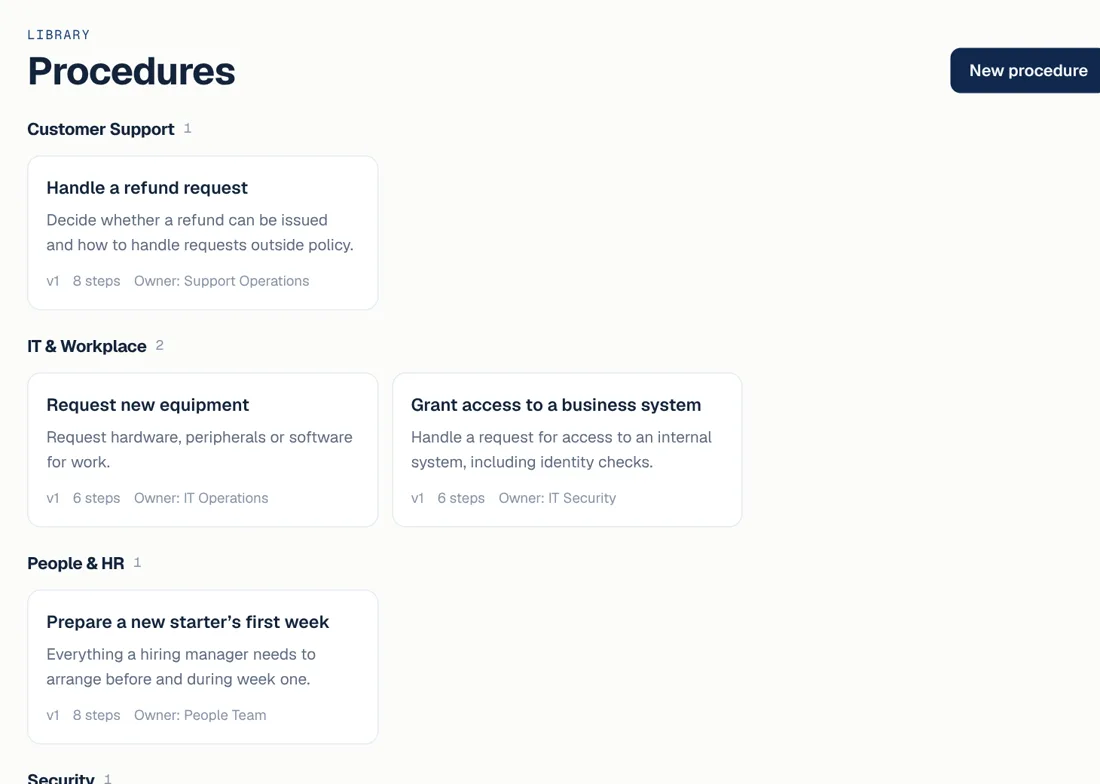 LibraryEvery procedure with its owner, version and number of steps.
 -
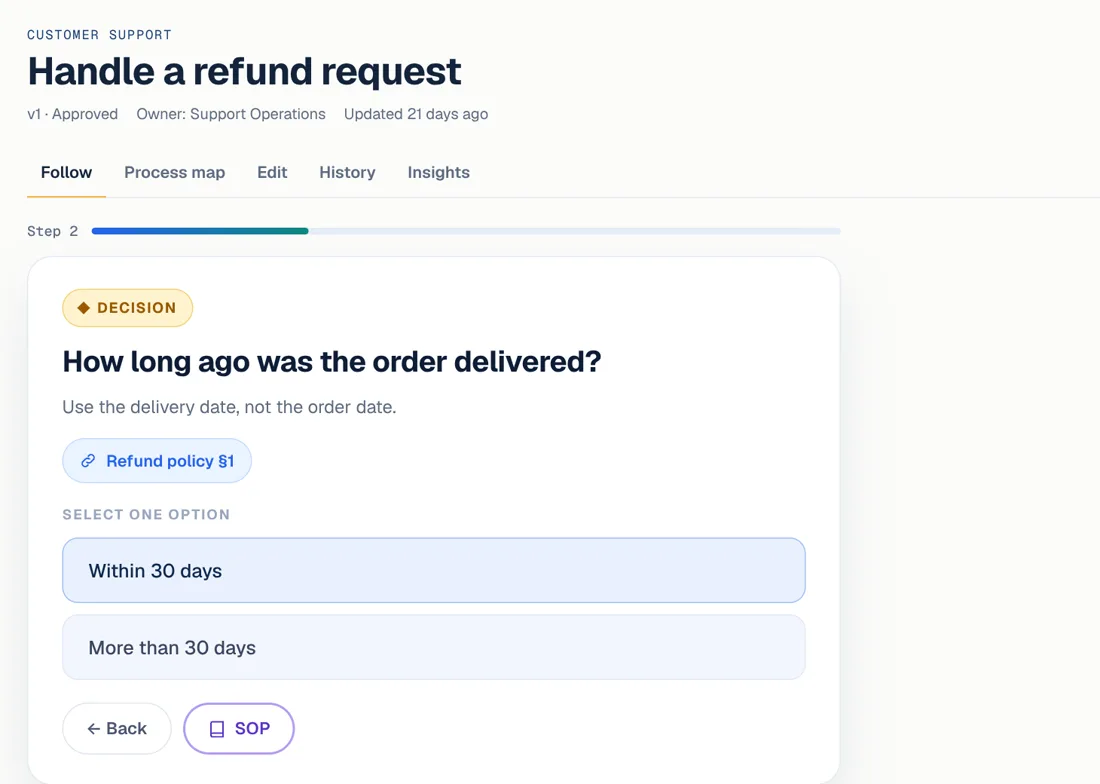 Guided runOne question at a time, with the policy source beside it.
 -
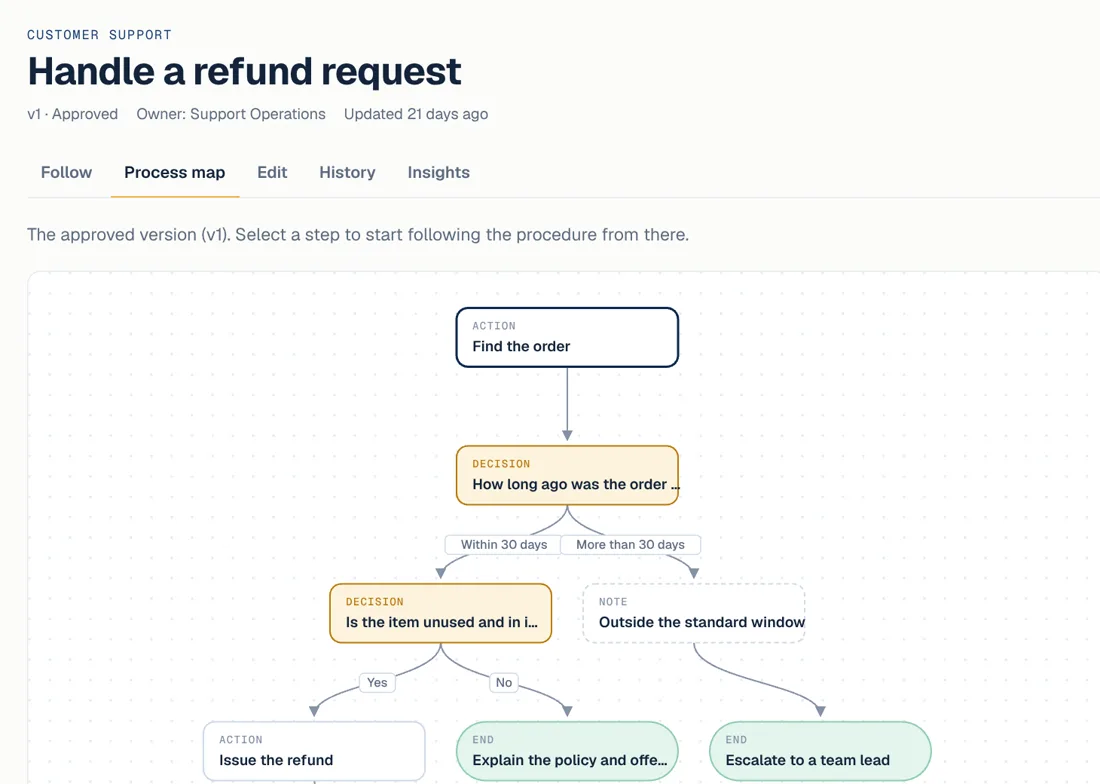 SOP mapDrawn from the same definition, so it always matches.
 -
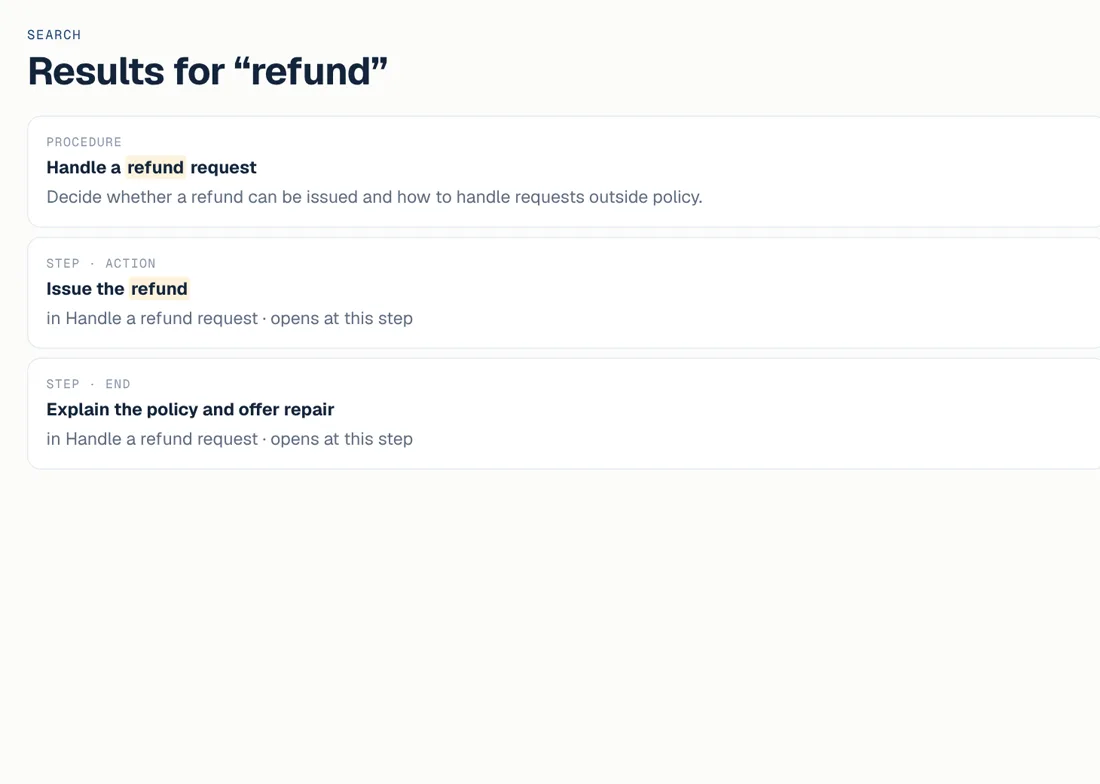 Step searchSearch lands on the exact step in the right procedure.
In the demo Works in the demo
- Guided runs, one question at a time
- SOP maps and step-level search
- Drafts, side-by-side review and approval
- Version history and an audit log
- Usage insights from this browser
Planned Not in the demo yet
- Sign-in and shared workspaces
- Storing procedures on a server
- Drafting procedures with SI
- Integrations, APIs and webhooks
- Training assignments and records
Outcomes
Pick a starting point. Follow the bearing.
Seven common problems and the direction guided work takes them. Each links to a solution page with a worked example. These are the intended effects, not measured results.
- TodayThe same task is done differently on every shift. With guided workOne SOP everyone follows, with clean handoffs. Business Operations
- TodayNew starters wait for someone to explain the process. With guided workGuidance in the flow of work from day one. Employee Enablement
- TodayAgents search for answers while the customer waits. With guided workThe right troubleshooting path, step by step. Customer Support
- TodayDocuments nobody updates after they are written. With guided workProcedures with owners, versions and reviews. Process Documentation
- TodayAnswers spread across wikis, chats and inboxes. With guided workKnowledge tied to the step it supports. Knowledge Management
- TodayNo record of which version people followed. With guided workApproved procedures with an audit trail. Compliance & Governance
- TodayThe same details typed into several systems. With guided workConnected actions with human checks (planned). Enterprise Automation
Architecture and trust
What runs today, and what comes next.
We keep what exists apart from what is planned. We do not hold security certifications today and will not claim any until they are earned.
One structured definition per procedure
Steps, decisions, exceptions, owner and version are stored once. Everything below is generated from it, so nothing drifts.
- Guided run
- SOP map
- Versions & audit
- Insights
Live Today
- The website is static and served over HTTPS by Vercel.
- The Studio demo keeps its data in your browser only. There is no server-side database and no customer data.
- Published versions, review and approval, version history and an audit log of changes work in the demo.
- Demo roles are a switch for trying the approval flow. They do not enforce access.
- No API keys or secrets are included in the site’s code.
Planned Planned for customer workspaces
- Secure sign-in with session expiry, password reset and invitations, then SSO and MFA.
- Each organization in its own workspace, with membership and role checked on the server for every request.
- Database-level isolation between organizations, tested explicitly.
- Audit records for administrative and data-changing actions.
- APIs and webhooks for connected systems.
Security & Governance capability →How security works today →

See how your work could become clearer.
Follow a sample procedure in the Studio, or tell us about a process your team finds hard to follow.